If you decide you no longer wish to use TESCO INTERNATIONAL, and would like to have your data deleted, you can delete your account directly in your app.
To do this, just follow the below steps:
Account - App Profile
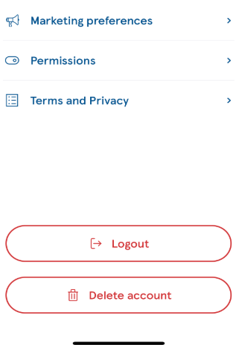
Once on your profile, you can delete your full account
This action cannot be undone, and you will be asked to confirm before fully processing. Following this, please just delete the app from your device.
This action is to only be taken when you wish to remove ALL your data. This is not to be used when re-installing the app.
You can also "Log Out" of your account if you wish to do so. When you do this, you will need to verify your account again.
Our FAQs cover everything you need to know about our app, so please take some time to familiarize yourself if you ever need any help.
You can contact our Customer Service team via the help & Support feature in your app. Either chat to us, or email directly at tescointernationalcalling@wavecrest.com
Was this article helpful?
That’s Great!
Thank you for your feedback
Sorry! We couldn't be helpful
Thank you for your feedback
Feedback sent
We appreciate your effort and will try to fix the article