You can change how you make your calls in the app. You change your call type options under the "Account" tab:
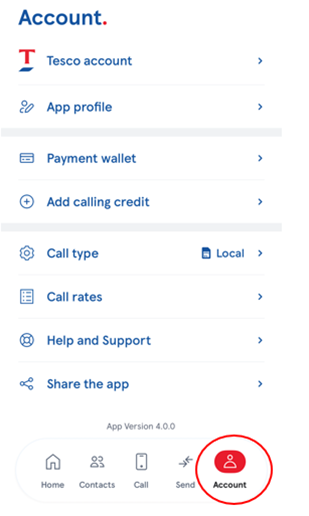
Local Call – You can connect via our local access number, which is a great option if you have inclusive bundled minutes from your mobile network operator. If you are on PAYG or have run out of bundled minutes, this will be charged by your network provider at their per minute landline rate.
Wi-Fi – If connecting by this option, you just need to ensure your Wi-Fi signal is strong and stable so that you have an uninterrupted experience. This is a great option if you don’t have inclusive minutes with your network provider, or if you’re travelling. It’s also a great solution when you are roaming, particularly outside of Europe.
Mobile Data/Wi-Fi – You again need to ensure your Wi-Fi signal is strong and stable so that you have an uninterrupted experience. Always make sure you have enough Mobile Data if you are using this instead of Wi-Fi.
Our FAQs cover everything you need to know about our app, so please take some time to familiarize yourself if you ever need any help.
You can contact our Customer Service team via the help & Support feature in your app. Either chat to us, or email directly at tescointernationalcalling@wavecrest.com
Was this article helpful?
That’s Great!
Thank you for your feedback
Sorry! We couldn't be helpful
Thank you for your feedback
Feedback sent
We appreciate your effort and will try to fix the article