We strive to keep our rates low and provide the best value for money on the market, and they can be even lower as we issue in app promotional codes. To make sure you never miss a promo code, ensure your marketing options are switched on. You can do this via:
Account - App Profile - Marketing Preferences
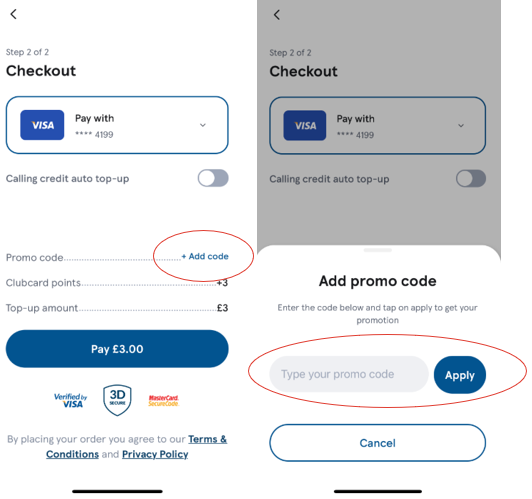
Our promo codes are usually issued in app, and it's important to add the promo code when making a top up. The option to add promo codes will appear as per the below image:
If you ever have issues adding or applying the code, just contact our Customer Service team.
Our FAQs cover everything you need to know about our app, so please take some time to familiarize yourself if you ever need any help.
You can contact our Customer Service team via the help & Support feature in your app. Either chat to us, or email directly at tescointernationalcalling@wavecrest.com
Was this article helpful?
That’s Great!
Thank you for your feedback
Sorry! We couldn't be helpful
Thank you for your feedback
Feedback sent
We appreciate your effort and will try to fix the article